We have an important software update to share with our Amazon Chime users.
What's happening: Amazon has officially ended support for the Amazon Chime service, including meetings and Business Calling features. Because Amazon Chime is no longer being supported as an active meeting platform, we will be removing Amazon Chime support from the MuteMe app in our next software release.
This change helps us keep the MuteMe software cleaner, faster, and focused on the meeting platforms our customers are actively using every day.
What Happened to Amazon Chime?
Amazon Chime was Amazon's video meeting and business calling platform. For years, MuteMe included support for Chime alongside Zoom, Microsoft Teams, Webex, Google Meet, GoToMeeting, Skype, Discord, and other platforms.
2025New Customers Stopped
2026Service Ends
In February 2025, AWS announced that Amazon Chime would stop accepting new customers and that support for the Amazon Chime service would end in February 2026. After that transition, users would no longer be able to host Amazon Chime meetings, manage users, or use Business Calling features.
Important note: Amazon has clarified that this change does not impact the Amazon Chime SDK, which is a separate developer tool used by other applications. But the Amazon Chime meeting app and service that MuteMe supported is no longer an active platform in the same way it was before.
What This Means for MuteMe Users
Starting with our next MuteMe software release, Amazon Chime will be removed as a supported conferencing platform inside the MuteMe app.
Good news: For most users, nothing will change. If you use MuteMe with Zoom, Microsoft Teams, Google Meet, Webex, Slack, Discord, GoToMeeting, Skype, FaceTime, or operating-system level mute, your device will continue to work as expected.
Supported platforms:
Zoom
Microsoft Teams
Google Meet
Webex
Slack
Discord
Amazon Chime
If you previously used MuteMe with Amazon Chime, we recommend switching to another supported meeting platform. The MuteMe device will continue to work with your computer and with the other platforms we support.
Why We're Removing It
We know software changes can be frustrating, especially when a platform you used goes away. But maintaining support for a discontinued meeting service creates unnecessary complexity and can slow down improvements for the platforms customers are actively using.
Our goal is to make MuteMe more reliable, easier to maintain, and better across the platforms that matter most to our customers.
That means focusing our development time on:
Improving support for active meeting platforms — Ensuring the best possible experience with platforms you use daily
Keeping up with changes — Staying current with updates from Zoom, Teams, Webex, Google Meet, and others
Reducing bugs — Eliminating issues caused by outdated integrations
Speed and usability — Making the MuteMe app faster and easier to use
"Maintaining support for a discontinued meeting service creates unnecessary complexity and can slow down improvements for the platforms customers are actively using."
MuteMe Is Still Moving Forward
One of the hardest parts of building hardware that works with meeting software is that the platforms change constantly. Sometimes features are added. Sometimes APIs change. Sometimes entire services are retired.
When that happens, we adapt.
Our Mission Remains
MuteMe was built to give users a simple, visible, physical way to control mute status during virtual meetings. That mission has not changed. We will continue improving support for the platforms people use every day, and we will continue making the MuteMe experience better across Windows, macOS, and Linux.
Need Help?
If you were still using Amazon Chime with MuteMe and need help switching to another supported platform, please contact us. We're here to help make the transition as smooth as possible.
We have important news to share with our Microsoft Teams users. After extensive conversations with Microsoft and careful analysis of their deprecation timeline, we want to give you a clear picture of what's happening and how we're responding.
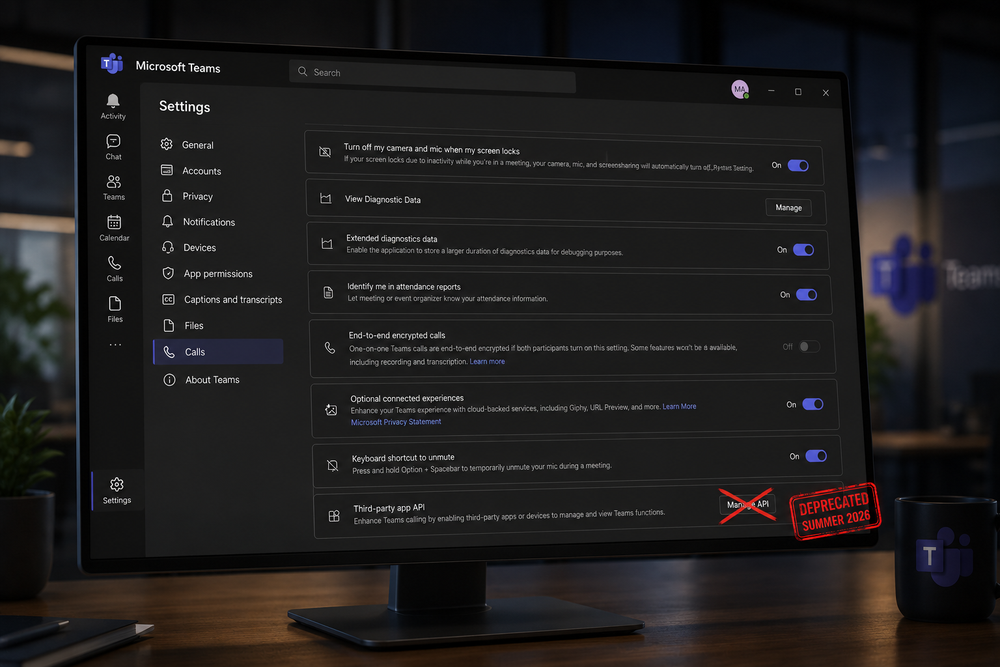
What's happening: Microsoft is deprecating the local third-party device API that MuteMe and other hardware devices use to integrate with Microsoft Teams. This API is being turned off in summer 2026.
The Background: How We Got Here
In early 2024, Microsoft introduced a new local API in the "new" Teams client to support third-party hardware integrations. The API was publicly documented and was used to power Microsoft's official Teams integration for the Stream Deck, which quickly became one of the most popular apps in the Stream Deck store.
Around the same time, Microsoft removed the accessibility methods that many third-party products, including MuteMe, had relied on for Teams integration. This effectively forced developers to migrate to the new API if they wanted to continue providing Teams controls to their customers. From our perspective, Microsoft's actions clearly signaled that the API was the intended path forward for hardware integrations.
We raised concerns with Microsoft about the accessibility changes, and many of our customers also contacted Microsoft to explain how important accessibility support was for their workflows.
The API itself was discoverable, stable, and intentionally designed for third-party integrations. It behaved like a supported platform interface and was actively being used by a wide range of projects and hardware vendors to integrate with Teams.
"The API was publicly documented and designed for third-party integrations. From a developer's perspective, it behaved like a supported platform interface and became a natural integration point for hardware and software projects."
— Our team, on the discovery of the Teams API
Microsoft's Position
Microsoft has stated that they are deprecating this API for two main reasons:
Security Concerns
Low Usage Numbers
According to Microsoft, the API only had around 11,000 monthly active users across the entire ecosystem—well under 1% of Teams' 300+ million users. Based on their telemetry, they felt the API did not meet their security standards and that rebuilding it would not be worthwhile given the limited adoption.
Our perspective: We believe these usage numbers may be incomplete. Our own data suggests significantly higher usage among users of physical mute buttons and similar devices. However, regardless of the exact figures, Microsoft's decision stands.
What This Means for MuteMe Users
If you use MuteMe with Microsoft Teams, you may have already noticed some instability or intermittent issues. This is because Microsoft has already stopped supporting the API, and it will be completely turned off this summer.
Without a working API, the direct integration between MuteMe hardware and Teams will no longer function as it currently does. This affects:
Real-time mute state synchronization — Your MuteMe will no longer automatically reflect your Teams mute state
Physical button control — Pressing your MuteMe may not control Teams mute as expected
LED status indicators — The visual feedback showing your meeting status may become unreliable
The Fix Is on the Way
We want to be clear: we have a solution in development. While Microsoft is removing this particular API, we are working on an alternative integration method that will restore full functionality for our Teams users.
Good news: We have a fix in the works and expect to release an update soon. We're committed to maintaining our Teams integration and are actively working on a replacement solution.
Our Approach
We'll be honest—we're going to miss this integration. Having a single, unified method to work with Teams on both macOS and Windows made development simpler and the user experience seamless. Unfortunately, without a supported local API, we now need to take a different path.
Going forward, we will need two dedicated controllers for Teams—one for Windows and one for macOS—similar to how we did things before this API existed. It's not ideal, but it will allow us to provide reliable integration using officially supported methods.
Seemless Integration
Using our new integration method, you won't have to worry about your configuration settings in teams, or integration breaking with the next Teams update.
Works with Free Teams
Unlike the deprecated API which only worked with paid Teams licenses, our new approach will work with the free version of Microsoft Teams as well.
Easy Enterprise Deployment
The new integration method will make it easier for organizations to deploy and manage MuteMe with Microsoft Teams across their infrastructure.
Timeline
Here's what we're looking at:
NowMicrosoft has deprecated the API. Existing functionality may be intermittent or degraded.
Summer 2026Microsoft officially turns off the API. Current integration will stop working completely.
Coming SoonMuteMe releases update with new Teams integration method. Full functionality restored.
What you can do now: Continue using MuteMe as normal. We'll notify you as soon as the update is available. In the meantime, if you experience any issues with your Teams integration, please reach out to our support team.
We Hear You
We know this is frustrating. Physical mute buttons and hardware integrations are not "nice-to-have" accessories for many of our users—they are essential tools for focused work, accessibility needs, and efficient meeting management.
We share your frustration with this decision. We believe Microsoft may be underestimating the real-world impact of removing this capability. However, rather than fighting a battle we cannot win, we're focusing our energy on building a better solution.
"These aren't just 'enthusiast' setups. For a lot of users, especially in focused work environments or accessibility scenarios, a physical control is meaningfully different from a keyboard shortcut or UI interaction."
— Why this matters
We want to thank everyone who has reached out to us about this issue, shared their stories, and provided feedback. Your voices matter, and we take them seriously.
Stay Updated
We'll keep this page updated as we have more information. If you have questions or concerns, please don't hesitate to reach out to our support team.
For over five years, Apple has been quietly laying the groundwork for the biggest architectural shift in Mac computing since the transition from PowerPC to Intel in 2006. That shift took about three years. This one is different.
"Rosetta was designed to ease this transition by automatically translating Intel-based apps for use with Apple silicon. This has given users and app developers more time to update their apps."
Apple Support, on the purpose of Rosetta
Five Years. Five Generations. One Clear Direction.
When Apple announced the transition to Apple Silicon in June 2020, many wondered if it was too soon, too ambitious, or both. Five years later, the answer is clear: it was the right move at the right time.
We've now seen five generations of Apple Silicon, starting with M1 in late 2020 and continuing through the M4 chips powering today's Macs. Each generation delivered meaningful improvements in performance, power efficiency, and capabilities. The trajectory has been remarkable.
5+Years of Apple Silicon
5Chip Generations
2020Transition Began
What makes this transition particularly impressive is not just the hardware. It is how Apple has supported the old while building the new. Rosetta 2, the translation layer that lets Intel apps run on Apple Silicon, has worked remarkably well. But all things come to an end.
Apple's Track Record: Better Support Than Anyone
One thing Apple does better than almost anyone in the industry is long-term support. When they transitioned from PowerPC to Intel in 2006, they kept those machines supported for years. When they moved to Apple Silicon, they did not abandon Intel users overnight.
macOS Tahoe (version 26) is the last major macOS release that will fully support Intel Macs. Apple has given Intel Mac users nearly six years of OS updates since the transition began.
Apple's approach has been to give developers and users ample time to adapt. That is the kind of support that turns a risky transition into a smooth evolution. But the writing is on the wall: the future is Apple Silicon, and it is arriving faster than many expected.
The Apple Silicon Leap: What Was Possible
Apple Silicon was not just about efficiency. It was about fundamentally rethinking what a personal computer chip could do. The integration of CPU, GPU, Neural Engine, and memory into a single package enabled capabilities that were previously impossible on consumer hardware.
Unprecedented performance per watt: All-day battery life with desktop-class performance became reality
Unified memory architecture: Memory shared between CPU and GPU eliminated traditional bottlenecks
Dedicated ML acceleration: The Neural Engine enabled on-device machine learning at scales previously impossible
Pro-level video editing: 8K editing and multi-stream 4K playback became native, without specialized hardware
These were not incremental improvements. They were generational leaps that redefined what users could expect from their computers.
The Timeline: What Happens When
Here is the reality of how software support will likely unfold for Intel Macs:
2026+Most major apps still support Intel Macs, but many new features become Apple Silicon-only. Security updates continue for Intel.
2027+Growing number of developers stop testing Intel Macs. New releases increasingly require Apple Silicon. Rosetta functionality becomes limited.
2028+Intel support becomes uncommon outside enterprise software. Similar to how PowerPC Macs are treated today: usable, but increasingly unsupported.
2030+Intel Macs become legacy hardware, similar to old PowerPC Macs. Functional for existing software, but no longer a development priority.
Key development: Apple has announced that macOS 27 will require Apple Silicon. Rosetta support is being phased out, removing the translation layer that has allowed Intel apps to run on newer Macs.
What This Means for MuteMe Users
At MuteMe, we have been ahead of this curve. We already offer a native Apple Silicon version of our software, and we have been shipping it for some time now.
MuteMe already supports Apple Silicon. If you are using an Intel Mac, we encourage you to download our native Apple Silicon version for the best experience.
We understand that many (nearly 4000 of you) are on Intel Macs, particularly the 2019 to 2020 MacBook Pro models and the many iMac users that remain popular in home office environments. We see you, and we are not abandoning you.
Our Commitment to Intel Mac Users
Here is our roadmap for Intel Mac support:
2027Full support for Intel Macs. Intel-compatible updates will continue
2028Intel support becomes "legacy" status. Bug fixes still released, but no new Intel-specific features shipped.
2029+Only maintained if significant paying customers are still using Intel Macs.
Why 2028? Based on industry trends and Apple's deprecation timeline, we expect Intel Macs to become increasingly unsupported by developers after 2028. We will continue monitoring usage data and adjust if needed, but our engineering focus will shift to Apple Silicon.
We believe in supporting our users through transitions. That means giving you advance notice, clear information, and plenty of time to make decisions about your hardware.
The Bigger Picture
This transition reflects something Apple does well: making bold architectural moves while carefully managing the user experience during the shift. Whether you are on an Intel Mac today or an Apple Silicon machine, you have not been left behind. You have been given time to plan.
The performance gains of Apple Silicon are real and significant. If you have been thinking about upgrading, the math increasingly favors making the jump. But if you are not ready, we will meet you where you are, for now and for the next few years.